

Overview
The Return-Path domain serves two critical functions in email delivery:- Bounce handling: Receives delivery failure notifications and spam complaints
- SPF authentication: Identifies which servers are authorized to send on your domain’s behalf
The Return-Path is also known as the
Envelope Sender, MAIL FROM, or Bounce Address. These terms are interchangeable.What Is SPF?
SPF (Sender Policy Framework) is a DNS-based authentication protocol that specifies which mail servers can send email for a domain. Receiving servers check SPF records to verify the sending server is authorized. For SPF to “pass” and align with your domain, the Return-Path domain must either match your sending domain or be a subdomain of it. This is called SPF alignment.How Lettermint Handles SPF
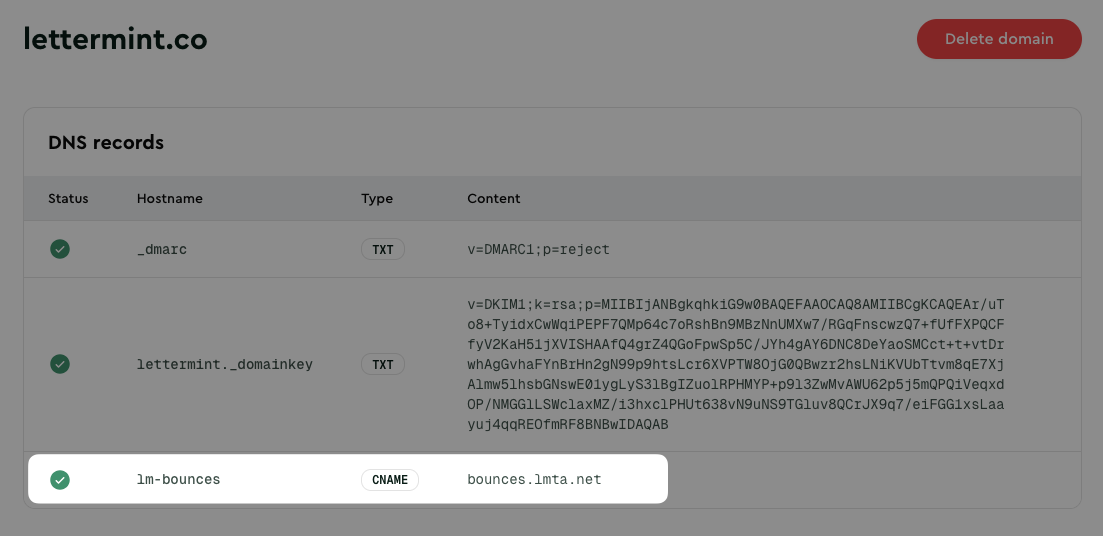
Lettermint uses a CNAME-based approach for SPF, which means you don’t need to create or maintain an SPF record yourself. Here’s how it works:- You add a CNAME record for
lm-bounces.yourdomain.com - The CNAME points to Lettermint’s infrastructure (
bounces.lmta.net) - We maintain the SPF record at that target domain
- When receiving servers look up SPF, they follow the CNAME and find our valid SPF record
Configuration
To set up your Return-Path for SPF:- Navigate to Domains in your dashboard
- Select your domain or add a new one
- Locate the Return-Path CNAME record in the DNS configuration section
- Add the record to your DNS provider
Verification
After adding the CNAME record, verify it’s configured correctly:Troubleshooting
CNAME Not Resolving
Ifdig returns no results:
- Wait for propagation: DNS changes can take up to 48 hours, though most propagate within minutes
- Check for typos: Ensure the hostname matches exactly what’s shown in your dashboard
- Verify the record type: Make sure you created a CNAME record, not a TXT or A record
Conflicting Records
CNAME records cannot coexist with other record types at the same hostname. If you have an existing A, TXT, or MX record atlm-bounces.yourdomain.com, remove it before adding the CNAME.
Cloudflare Proxy
If using Cloudflare, ensure the proxy status is set to “DNS only” (gray cloud), not “Proxied” (orange cloud). CNAME records used for email authentication should not be proxied.FAQ
Do I need to add a separate SPF record?
Do I need to add a separate SPF record?
No. Lettermint’s CNAME-based approach handles SPF automatically. The Return-Path CNAME points to our infrastructure, where we maintain the SPF record. You don’t need to add
include:spf.lmta.net to your root domain’s SPF record.I already have an SPF record on my domain. Will this conflict?
I already have an SPF record on my domain. Will this conflict?
No. Since Lettermint uses a subdomain (
lm-bounces.yourdomain.com) with a CNAME record, it operates independently from any SPF record on your root domain. Your existing SPF configuration remains unchanged.Can I use multiple email providers with different SPF records?
Can I use multiple email providers with different SPF records?
Yes. Each provider can use its own subdomain for the Return-Path, allowing multiple SPF configurations to coexist. Lettermint’s approach is designed to work alongside other email providers without conflicts.